What Nanonets Brings to the Table
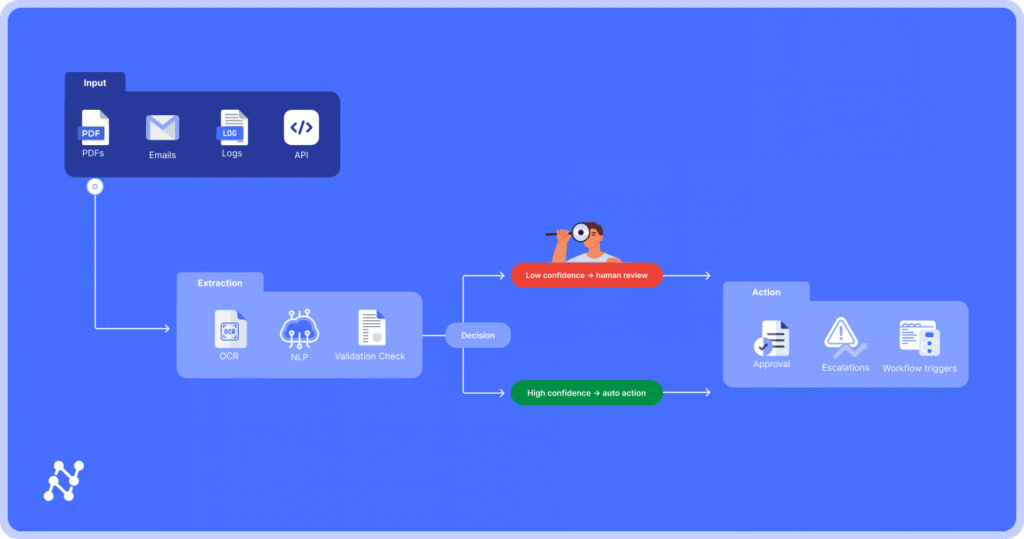
Nanonets has gained attention for its focus on automated data extraction, intelligent document processing, and workflow simplification. At its core, the platform uses machine learning to read, understand, and pull data from documents without heavy manual setup. This is a major draw for teams dealing with invoices, receipts, purchase orders, forms, or any process that leans on repetitive data entry. Instead of building complex rules or templates, users can train models with a handful of examples. This ease of adoption helps companies that want automation without the usual technical headache. Nanonets also offers multiple prebuilt models that handle common document types nanonets review. These models can be applied right away, which saves time for users who need fast results. The interface is clean and simple, which keeps the learning curve light for nontechnical users. The platform also connects with tools like Zapier, QuickBooks, HubSpot, and Google Sheets, which helps teams move data across systems with little friction. For businesses that want to scale their automation quickly, this mix of flexibility and simplicity is one of Nanonets biggest strengths.
Accuracy and Performance in Real Workflows
Any document automation tool is judged by how well it captures information without constant corrections. This is an area where Nanonets performs well overall. Its OCR is strong, and its models handle different layouts, fonts, and document qualities with solid consistency. Users note that accuracy improves as the model learns from feedback, and this training loop is straightforward. Even so, accuracy depends on the clarity of the documents. Poor scans or heavily unstructured inputs may require some manual correction early on. In most cases, though, the error rate drops as the system gets more examples to learn from. Processing speed is also a highlight. Whether users upload batches of invoices or work with real time document flows, the system moves quickly. For companies handling large volumes, this speed can cut hours of manual work. With the right setup, Nanonets can handle thousands of documents while keeping performance stable.
Where Users Find Limitations
Despite its strengths, Nanonets is not without drawbacks. Some users feel the pricing can become high as usage grows, especially for companies that process documents at scale. While the platform offers flexible plans, the cost may exceed expectations for small businesses with limited budgets. There are also times when customization requires more support than expected. While the platform is built to avoid complex configurations, highly specific workflows may still need help from the Nanonets support team. The good news is that support is responsive, but it does mean some advanced use cases might not be entirely plug and play. A few users also mention that the analytics and reporting features could be deeper. The platform focuses heavily on extraction accuracy and workflow automation, and less on giving detailed insights into long term trends or processing patterns. For teams looking for advanced reporting, this may feel like a gap.
Final Verdict: Who Nanonets Works Best For
Nanonets stands out as a strong choice for businesses that want fast, accurate, and flexible document automation without building complicated systems on their own. Its strength lies in user friendly model training, solid OCR performance, and smooth integrations. It fits especially well for finance teams, operations departments, logistics workflows, and any business that needs to cut the time spent on manual data entry. Its limitations mostly affect companies with complex customization needs or tight budgets. For most users, though, Nanonets provides a reliable and efficient automation solution. It reduces workload, cuts errors, and frees teams to focus on work that matters.